


Passkeys vs Passwords: How This New Login Method Is Changing Online Security
- Blog Artificial Intelligence Industry Trending News
- Entrepreneurs Story News
- October 29, 2026
- 6
- 18 minutes read
Almost all of us have that one password we use everywhere. Maybe it’s a pet’s name with “@123” at the end. It’s easy to remember, but it’s also easy to steal. That is exactly why the passkeys vs passwords debate has become so important today.
Passkeys are a new way to log in without typing a password. Instead, you use your phone’s fingerprint, face unlock or screen PIN. Google, Apple and Microsoft already support them, and the FIDO Alliance estimates that around 5 billion passkeys were in use worldwide by May 2026.
In this article, we’ll explain how passkeys work, compare their security with passwords, and share a simple step-by-step plan for businesses that want to make the switch.
How Do Passkeys Work vs Traditional Passwords?
Let’s look at both, one by one.
How a password works
When you create an account, you choose a password. The website saves a scrambled (hashed) copy of it on its server. Every time you log in, you type the password, it travels to the server over an encrypted connection, and the server checks whether it matches.
The problem is simple. The same secret sits with both you and the website. If a hacker tricks you into typing it on a fake site, or steals the website’s database, your account is in danger.
How a passkey works
A passkey uses two matching keys instead of one shared secret:
- Public key: This is saved with the website. It’s safe even if someone sees it, because it can’t be used to log in.
- Private key: This stays with you, saved in your phone’s or laptop’s secure storage, or in your password manager. It is never sent to the website.
Here’s what happens when you log in:
- The website sends your device a random “challenge”.
- You unlock with your fingerprint, face or PIN.
- Your device signs the challenge with your private key and sends back the signature.
- The website checks the signature using your public key. If it matches, you’re in.
Your private key is never shared with the website. With synced passkeys, it is copied between your own devices, but only in encrypted form. So even if the website gets hacked, the attacker gets nothing they can use to log in as you.
Passkeys vs Passwords Security Comparison
So, are passkeys safer than passwords? For most everyday attacks, the answer is yes. Let’s check the common threats one at a time.
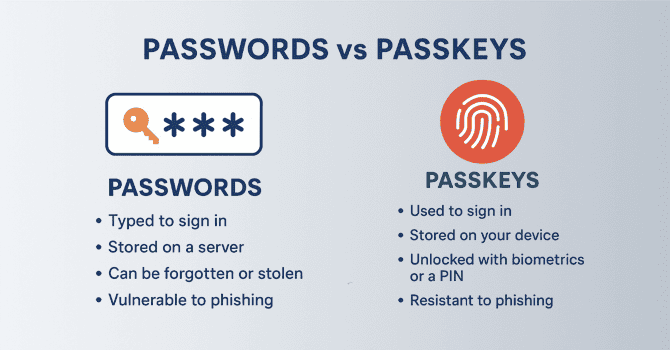
1. Phishing (fake websites and links)
- Passwords: High risk. A fake bank page or a fake email link can easily trick you into typing your password.
- Passkeys: Very strong protection. A passkey only works on the real website it was created for, so a fake site simply can’t use it.
2. Credential stuffing (reused passwords)
- Passwords: High risk. If you use the same password on many sites, one leak can open all your accounts.
- Passkeys: Not possible. Every passkey is unique to one website.
3. Server data breach
- Passwords: Hackers can try to crack stolen password hashes on their own computers.
- Passkeys: Low risk. Websites store only public keys, which can’t be used to log in.
4. Guessing attacks (brute force)
- Passwords: Weak passwords like “123456” can be guessed in seconds.
- Passkeys: Practically impossible to guess.
The biggest win is phishing protection. Your browser makes sure a passkey is used only on the genuine website. In India, where fake bank links and “share your OTP” calls are a daily headache, this makes a real difference.
One honest note: passkeys protect your login, but they don’t stop every attack. If someone gets hold of your unlocked phone, or there’s malware on your device, you still need to be careful.
Passkeys vs Password Managers 2026
Many people ask: “I already use a password manager, so do I still need passkeys?” The good news is that you don’t have to choose. Popular password managers like 1Password and Bitwarden can now save and sync passkeys too.
There are two main ways to keep your passkeys:
Synced passkeys
These are saved in your phone’s or computer’s own system, such as Apple iCloud Keychain or Google Password Manager, or in a third-party password manager. They sync across all your devices.
- Advantage: Easy to use, and you don’t lose access when you change your phone.
- Best for: Most people and most businesses.
Device-bound passkeys (security keys)
These live on one physical device, such as a YubiKey or Google’s Titan Security Key, and are never copied anywhere else.
- Advantage: The highest level of security.
- Best for: IT admins, finance teams and other high-risk users.
Password managers are still useful for older websites that don’t support passkeys yet. But wherever passkeys are available, you no longer need to type, copy or remember anything.
Benefits of Passwordless Authentication for Business
For companies, passkeys are not just about security. They also save a lot of time and money.
- Fewer IT support tickets: Gartner has estimated that 20% to 50% of help desk calls are about password resets. The FIDO Alliance’s Passkey Index (October 2025) found an 81% drop in login-related help desk incidents after companies adopted passkeys.
- Faster logins: The same report found that passkeys cut sign-in time by 73%, to about 8.5 seconds on average.
- More successful logins: Passkey sign-ins succeeded 93% of the time, compared with 63% for other methods. That means fewer customers give up at the login or checkout page.
- Easier compliance: NIST’s updated digital identity guidelines accept synced passkeys, and US cybersecurity agency CISA recommends phishing-resistant MFA. PCI DSS 4.0 also refers to phishing-resistant authentication.
Transition from Passwords to Passkeys Guide
Switching a whole company overnight is not a good idea. Here’s a simple three-step transition from passwords to passkeys guide.
Step 1: Check your login system
Make sure your single sign-on (SSO) or identity provider supports passkeys (the FIDO2/WebAuthn standard). Most big providers do, but check your plan and settings.
Step 2: Start small, then expand
Don’t force everyone at once. Start with high-risk teams like IT, finance, and senior management. Keep the old login method as a backup for now, and let other teams join slowly.
Step 3: Plan for lost phones and recovery
People lose phones; it happens. Decide in advance how employees will regain access to their accounts, for example, through IT-led identity checks before re-enrolling. Make recovery as strong as the login; otherwise, attackers will target the recovery process. Once most people are on passkeys, switch off password logins.
Why Passwords Are Dead in Modern Cybersecurity
To be fair, passwords are not literally dead. They are still everywhere. But the idea of depending only on a password is.
Today’s hackers use automated tools that create fake login pages and steal passwords, OTPs, and even login cookies in real time. Meanwhile, most of us keep reusing simple passwords. Making password rules more complicated doesn’t fix this; people just write them down or reuse them.
That’s why big tech companies have picked a side in the passkeys vs passwords debate. Since May 2025, new Microsoft accounts are passwordless by default. Passkeys move security away from human memory and onto your own device.
Conclusion
For most people and businesses, the passkeys vs passwords question now has a clear answer: passkeys technology are safer, faster and easier to use. Passwords won’t disappear overnight, and you’ll still need them for older sites for some time. But whenever a website or app offers passkeys, switch them on. Businesses should start with a small pilot, plan for account recovery, and move step by step.
Frequently Asked Questions (FAQ’s)
1. What is the main takeaway from a passkeys vs passwords security comparison?
Passkeys are much harder to steal. Your private key stays with you, so fake websites and data leaks can’t easily expose it.
2. Are passkeys safer than passwords on a shared computer?
Yes. You can scan a QR code with your phone and log in without saving anything on the shared computer. Your phone needs to be close to the computer because Bluetooth is used to confirm this.
3. How do passkeys work vs traditional passwords if I lose my phone?
If your passkeys are synced through Google, Apple or a password manager, they’ll be back on your new phone once you sign in. At work, IT can help you re-enrol after verifying your identity.
4. What is the difference in passkeys vs password managers 2026?
Password managers now store both passwords and passkeys. Use passkeys wherever possible, and keep the manager for older sites.
5. What are the main benefits of passwordless authentication for business?
Strong protection against phishing, fewer password reset tickets, faster logins, and easier compliance.
6. Why passwords are dead in modern cybersecurity: is it really true?
Not fully. Passwords are still used everywhere, but on their own, they are too easy to phish or reuse. Passkeys fix this problem.